
How to Download Pinterest Videos on iPhone
Works on iOS 13 and later using Safari's built-in download manager.
Last updated · Reviewed by the PinSaveHD team · How we check facts
To download a Pinterest video on iPhone, tap Share → Copy link in the Pinterest app, open PinSaveHD in Safari, paste the link and tap Download. Safari saves the MP4 to Files › Downloads. Open it there and tap Share → Save Video to move it into Photos.
Step by step
- 1Copy the pin link
In the Pinterest app, open the pin and tap Share → Copy link.
- 2Open PinSaveHD in Safari
Paste the link into the box and tap Download.
- 3Save the file
Tap Download next to the MP4. Safari saves it to Files › Downloads.
- 4Move it to Photos
Open the file in Files, tap Share → Save Video.
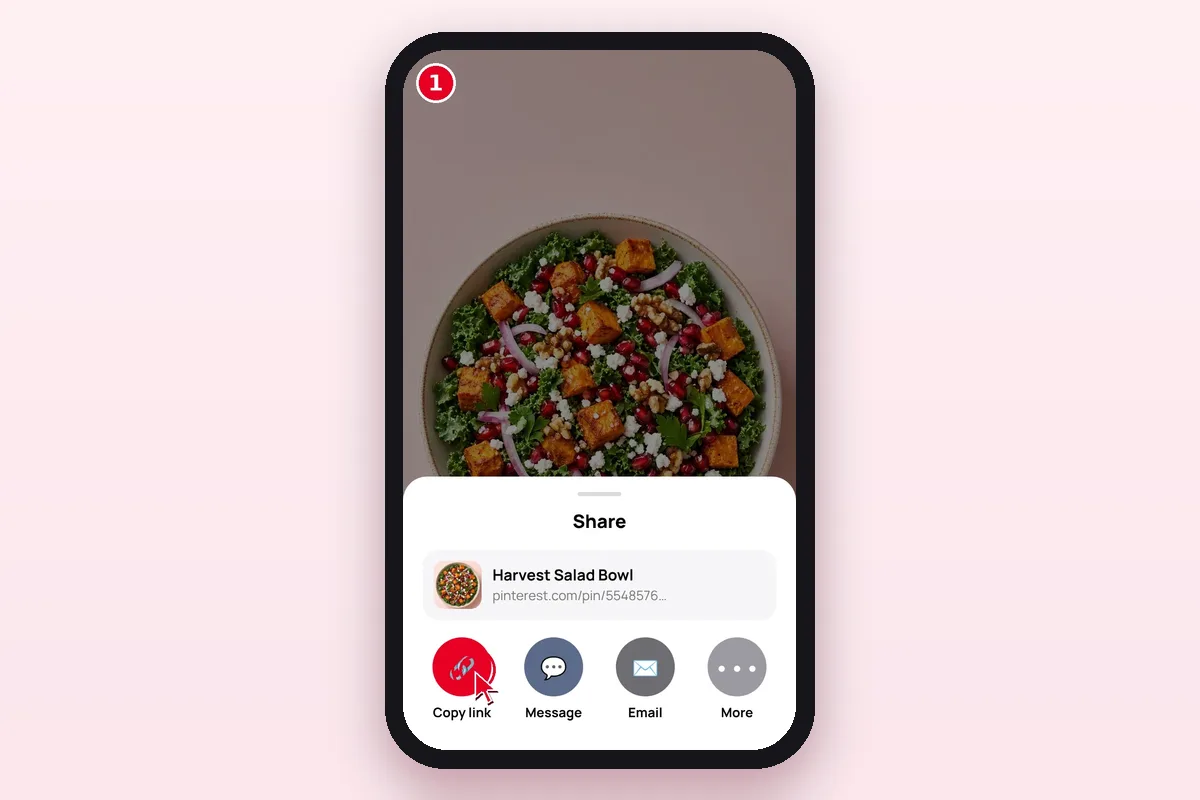 1. Share → Copy link
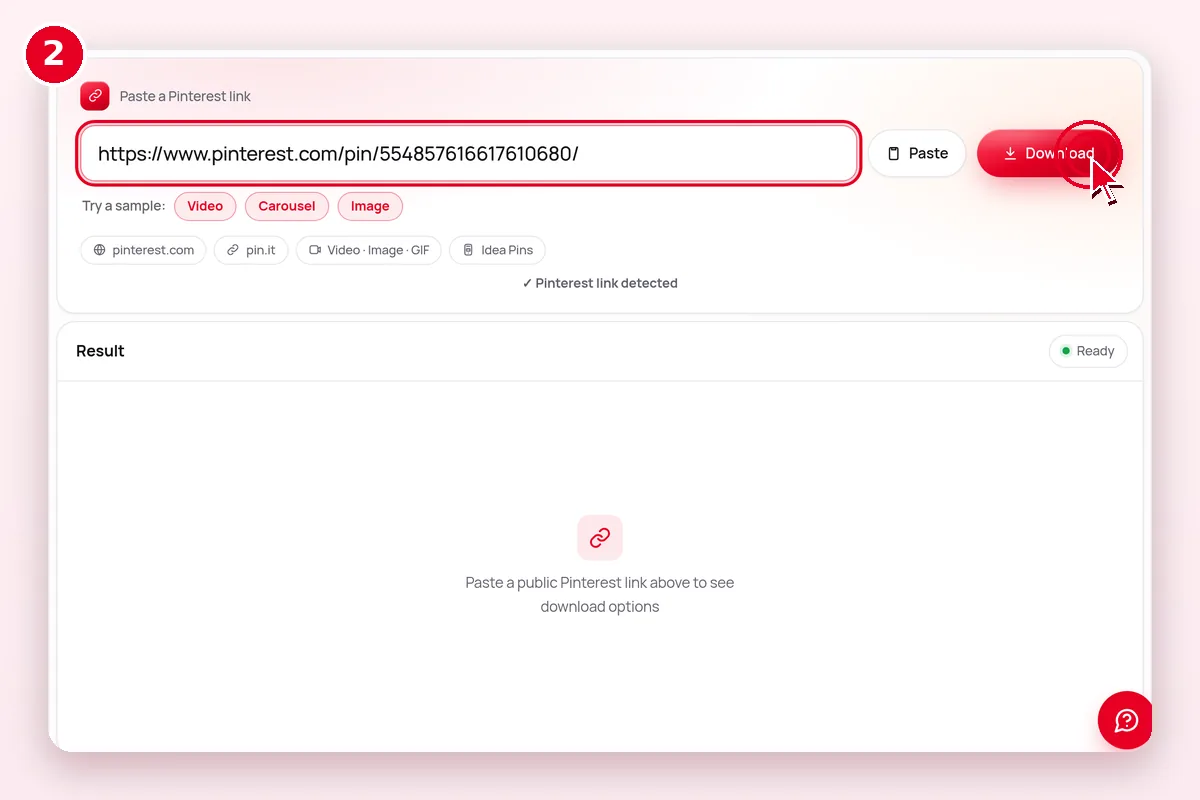 2. Paste the link and tap Download
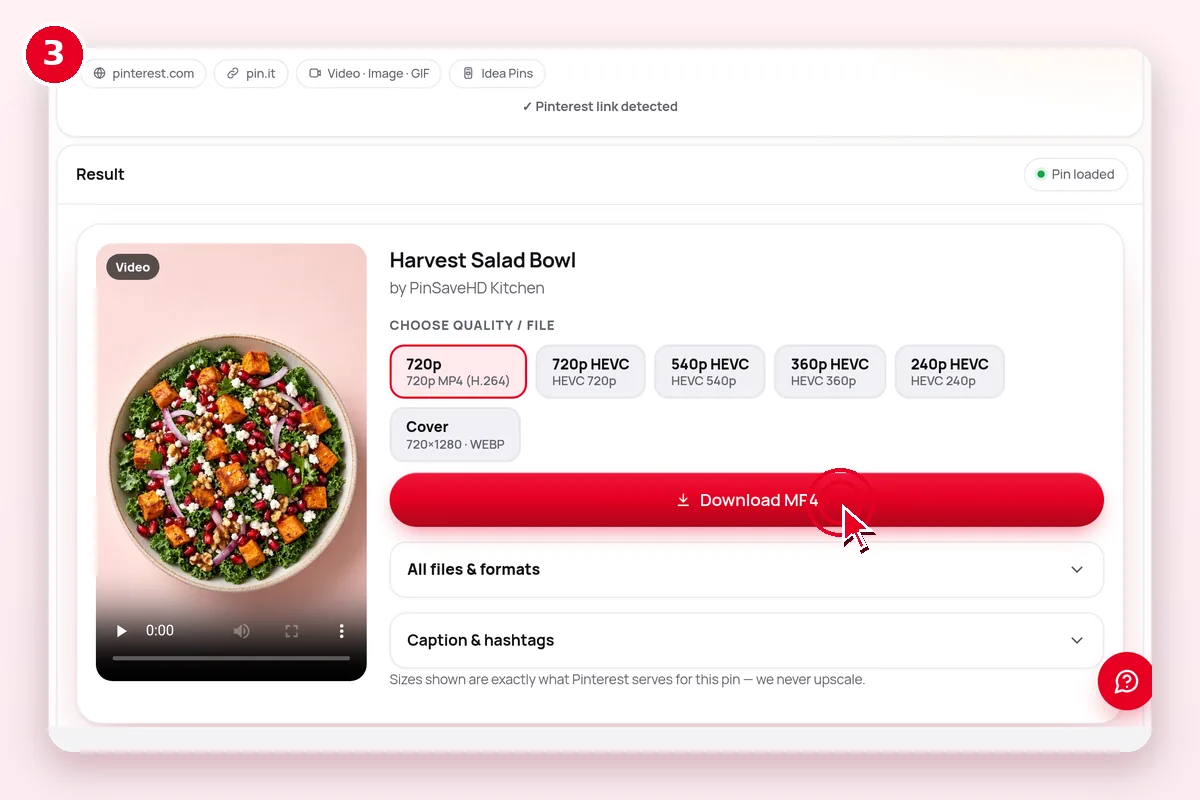 3. Pick a size and save
Where do downloaded files go?
| Device | 1. Copy the link | 2. Where the file goes | Tip |
|---|---|---|---|
| iPhone / iPad | Pin → Share → Copy link | Files › Downloads (Safari) | Open the file, tap Share → Save Video/Image for Photos. iPhone guide |
| Android | Pin → Share → Copy link | Downloads folder, shows in Gallery | Use Chrome. Android guide |
| Windows / Mac | Copy the address bar URL | Downloads folder | Press Enter after pasting. PC & Mac guide |
| Chromebook | Copy the address bar URL | Files › Downloads | Drag files to Google Drive to back them up. |
More details
Steps
- In the Pinterest app, open the video pin and tap Share → Copy link.
- Open Safari and go to PinSaveHD. Paste the link and tap Download.
- Choose the H.264 MP4 (most compatible). Tap Download in Safari's prompt.
- Tap the blue arrow in the address bar → Downloads, open the video, then Share → Save Video.
Troubleshooting
- If the video opens in a player instead of downloading, long-press the button → Download Linked File.
- HEVC files may not play on very old iPhones; pick H.264.
- Chrome on iOS also works, but Safari is most reliable for saving to Photos.
Related tools
 Video DownloaderHD MP4 from any public pin
 Image DownloaderOriginal full-size photos
 GIF DownloaderAnimated GIF pins
 Idea Pin / StoryEvery page of an Idea Pin
 Carousel DownloaderAll slides at once
 Board DownloaderWhole board → ZIP
Explore: all Pinterest tools · creator tools · guides · FAQ hub · how-to guide · Pinterest glossary · use cases · blog
Frequently asked questions
Why does the video open instead of downloading on iPhone?
Safari sometimes plays MP4s. Tap the Share button on the player and choose Save to Files, or long-press Download and pick Download Linked File.
How do I move a Pinterest video to Photos?
Open Files › Downloads, tap the video, tap Share and choose Save Video.
Do I need an app?
No. Safari can download files since iOS 13.
Where do files go?
Files → Downloads, until you save them to Photos.
Is PinSaveHD free?
Yes. It is free, with no sign-up and no watermark. A fair-use limit of about 30 lookups a minute applies.
Can I download private Pinterest pins?
No. Only public pins work. Private boards, secret boards and deleted pins cannot be saved, and we never ask for a login.